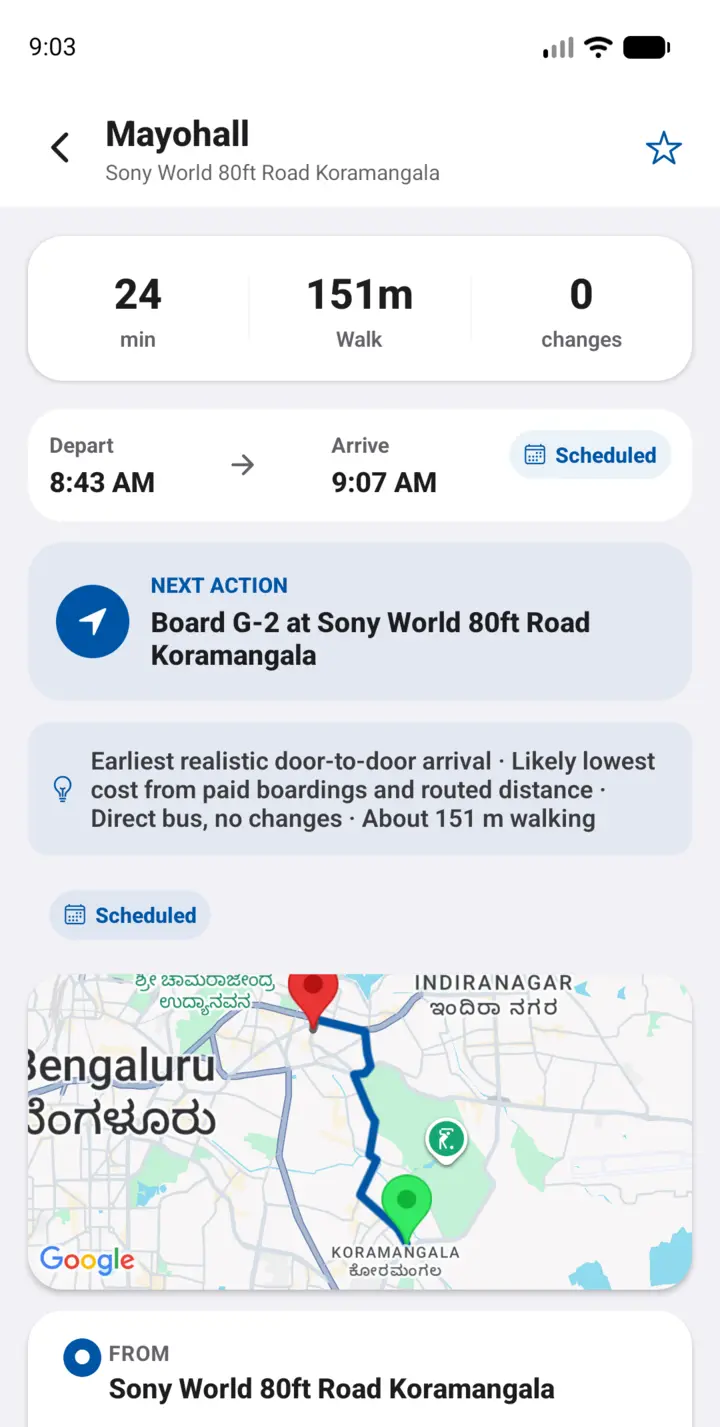
- Walk to Sony World 80ft Road, Koramangala
- 141-K toward Shivajinagara Bus Station
- Alight Mayohall — the MG Road / Brigade side
Scheduled About 33 min Sony World to Mayohall in the published timetable
ಸಾರಥಿ Independent · Bengaluru · English + Kannada
You already know the 500D on the ring road. You already know MG Road will be slow. Sarathi shows the whole trade-off — BMTC, Namma Metro and the walk between them — and whether a time is from the timetable or truly live.
Not affiliated with BMTC or BMRCL. No Play Store listing yet.
One commute, two answers

From the BMTC dataset
Sony World 80ft → Mayohall
Scheduled About 33 min Sony World to Mayohall in the published timetable
Scheduled G-2 is a Sarjapura–Mayohall service in the dataset, not a ring-road 500-D
Route number, direction, headsign, stop order and boarding-side notes — so you board the right bus on the right side of the road.
Station access and interchange walks are in the same plan. “Nearest Metro” is not automatically best.
Fastest, shortest route, likely cheapest, fewest changes and direct bus. A useful direct service is never buried.
The Android app is built for phone verification and persistent sessions. Public OTP delivery is not enabled yet.

The colours you already use
BMTC blue, Metro purple and green, walking in its own colour. Sarathi does not invent a new transit map — it uses the one Bengaluru already painted.
4,381 route patterns in the current dataset, including variants that map apps often hide.
85 stations, with Purple, Green and interchange walks counted in the full door-to-door time.
Compare the closest stop with a better-connected stop or station entrance, including the real walk.
On the street
Sarathi is built for the minutes you are already moving — not a dashboard you study at home.
Walk to the Koramangala stop the 141-K and G-2 actually serve.
Scheduled toward Shivajinagara Bus Station. Check the headsign before you step on.
MG Road / Brigade side. Or take G-2 and change at Trinity Circle for Purple Line.
Home, office and the last plan remain on-device if the network drops. City-wide offline replanning is not ready yet.
The legend every time carries
Bengaluru does not yet publish a city-wide authorised realtime feed that Sarathi can use. Until that exists, clock times stay honest.
| Scheduled | From the published BMTC or Metro timetable. Useful. Not a GPS prediction. |
|---|---|
| Typical | How often this service usually runs when a clock-face timetable is missing. |
| Cached | A time Sarathi already fetched. It may be a little older than right now. |
| Live | Shown only when a fresh, authorised realtime feed is actually connected. |
| Unavailable | Sarathi does not have a trustworthy time, so the field stays blank. |
Full meaning of each label · Data freshness methodology · How they appear in the app
Bengaluru journey guides
Search-friendly, answer-first guides explain what Sarathi can support today, which data it uses and where its limits are.
How BMTC buses, Namma Metro and walking fit into one door-to-door journey.
Direct bus, route direction, stop order and why Scheduled is not Live.
Station access, interchange walking and the limits of the current Metro dataset.
Fastest, fewest changes, direct bus and the walk between modes in one comparison.
Who is behind this
ಸಾರಥಿ means the one who holds the reins. Sarathi is an independent product for people who already ride this city — not a BMTC, BMRCL or government service, and not a ticket seller.
Plans are built from published transit datasets and walking access. Fares, closures and last-minute diversions still belong to the operator you see on the road. Read the full about page for data sources, launch status and what is still missing before a public listing.
Before you travel
No. Sarathi is an independent Bengaluru public-transport companion. Always follow operator notices, station boards and staff directions while travelling.
Only when Bengaluru publishes a fresh, authorised live feed. Until then, times are Scheduled or Typical — clearly labelled, never called “live.”
Verify the mobile number you control with a one-time code. The usage guide has the full login steps.
The app does not display fare amounts. “Likely cheapest” only ranks options. Confirm the actual fare with BMTC or BMRCL before you pay.
Saved places and recent journeys stay on your phone. You can reopen a recent plan for a short time, but Sarathi cannot yet replan a new trip across the city offline.
Open Settings → Delete account. That removes your server account and sign-in sessions. Details are in the Privacy Policy.
The Android app is being prepared for a public Play Store listing. There is no verified download link yet — follow the usage guide now, then return to What’s ready when a store listing is public.
Timetables, fares and route conditions can change. Sarathi does not sell tickets or guarantee service. Confirm vehicle, direction and fare with posted operator information. Terms · Privacy · About and launch status.
Sarathi is being prepared for Android. There is no verified Play Store link yet. Read the usage guide, then come back when the listing is public.